Raspberry Pi and AR0234 and AR0822 CSI-2 cameras - How To
Explains how to use AR0234 and AR0822 CSI-2 camera with Raspberry Pi computers
Prepare SD card
There are other SD card prepare tools but for this article will stick with Raspberry Pi Imager. It will allow you to select Raspberry Pi device, operating system and some settings like wireless AP and SSH for headless installations. This is basics, and if something is not clear official Raspberry Pi instructions should be followed.
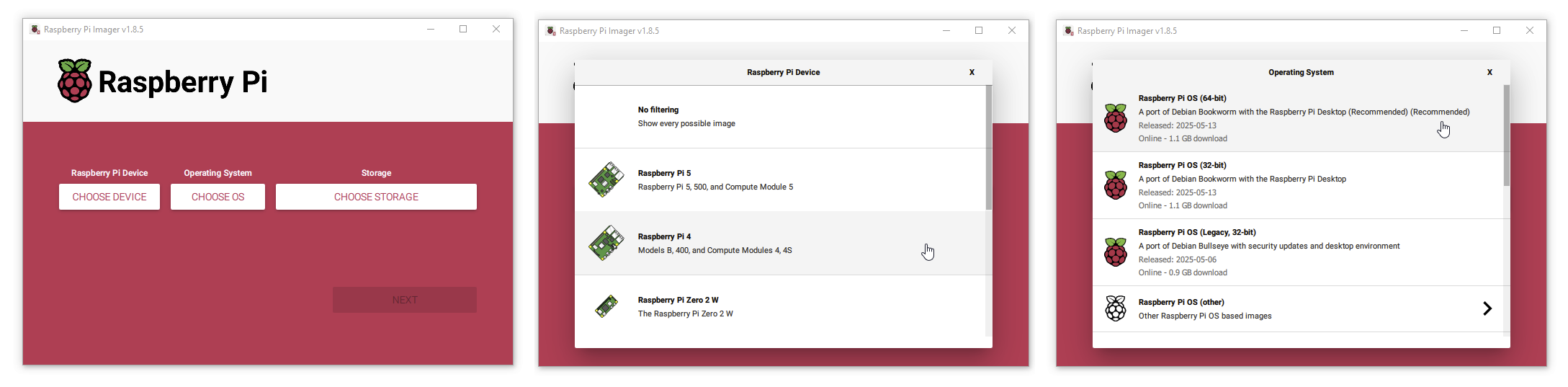
Raspberry Pi 4 CM Bookworm
Prepare SD card
- Device: Raspberry Pi 4 (Models B, 400, and compute Modules 4, 4S)
- OS: Raspberry Pi OS (64-bit) (tested with release 2025-07-13)
Connect CSI2 camera
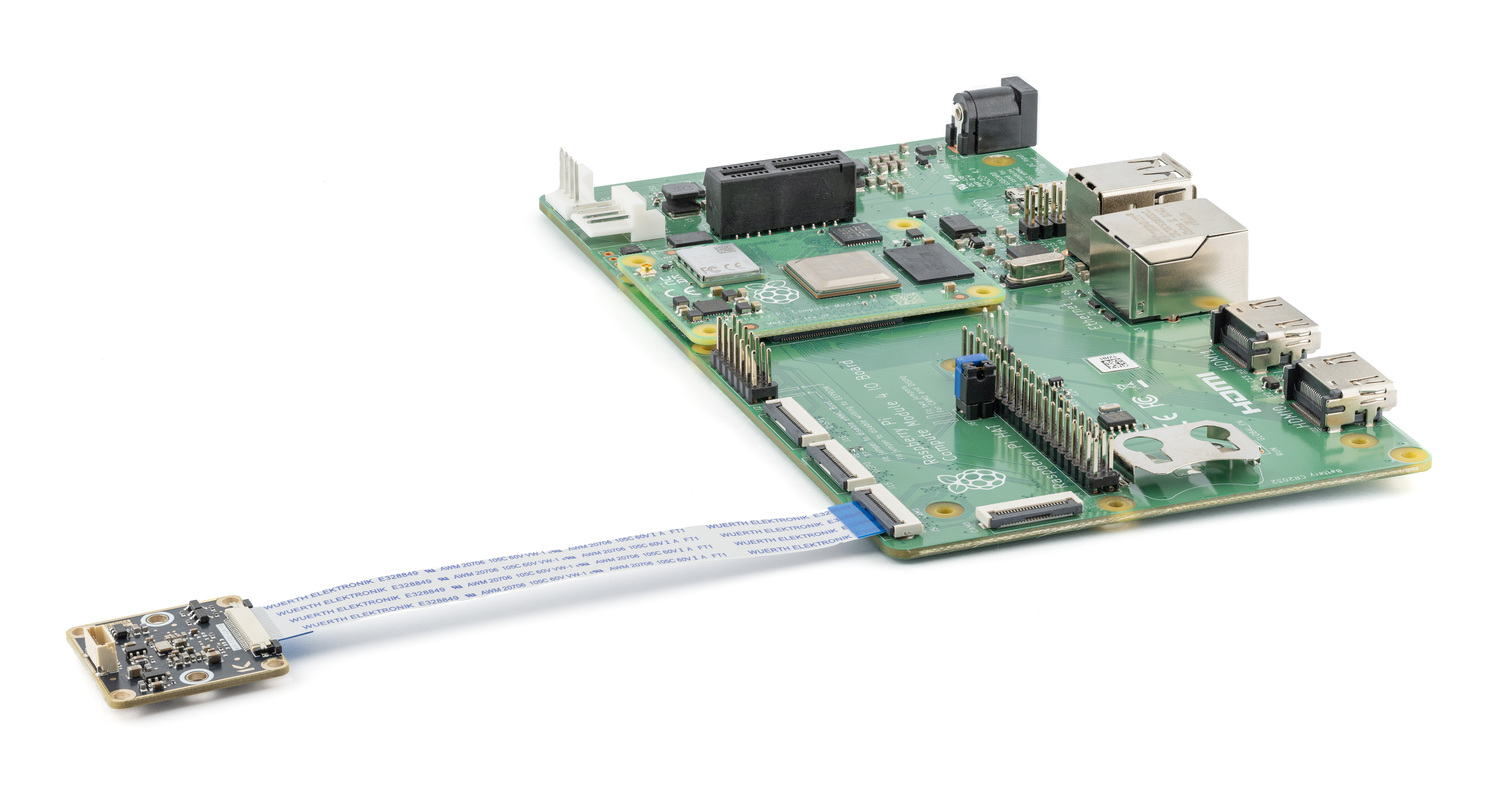
In this picture camera is connected to cam1 port.
OS Prepare
Login to your Raspberry device and update it first.
sudo apt update
sudo apt upgrade -y
AR0234
Camera 234x-CSI-M12x
Install AR0234 kernel driver, follow instructions on github. This will take some time.
Edit config file:
sudo nano /boot/firmware/config.txt
# camera_auto_detect=1 --- Find camera_auto_detect=1 and comment it out.

# Paste these lines at the end of the config file
dtoverlay=ar0234,cam1
camera_auto_detect=0
Reboot
Test camera
Check if camera is detected
rpicam-hello --list-cameras

Available cameras
-----------------
0 : ar0234 [1920x1200 10-bit GRBG] (/base/soc/i2c0mux/i2c@1/ar0234@10)
    Modes: 'SGRBG10_CSI2P' : 1280x800 [90.11 fps - (314, 190)/1280x800 crop]
                             1920x1200 [60.47 fps - (0, 0)/1920x1200 crop]
           'SGRBG8' : 1280x800 [90.11 fps - (314, 190)/1280x800 crop]
                      1920x1200 [60.47 fps - (0, 0)/1920x1200 crop]
Capture picture to /tmp/test.jpg
rpicam-jpeg -o /tmp/test.jpg -n

[0:01:49.868191487] [1657]  INFO Camera camera_manager.cpp:326 libcamera v0.0.0+5529-1565507d
[0:01:49.909305340] [1658]  WARN RPiSdn sdn.cpp:40 Using legacy SDN tuning - please consider moving SDN inside rpi.denoise
[0:01:49.911981503] [1658]  INFO RPI vc4.cpp:447 Registered camera /base/soc/i2c0mux/i2c@1/ar0234@10 to Unicam device /dev/media3 and ISP device /dev/media1
[0:01:49.912148873] [1658]  INFO RPI pipeline_base.cpp:1121 Using configuration file '/usr/local/share/libcamera/pipeline/rpi/vc4/rpi_apps.yaml'
Mode selection for 960:600:12:P
    SGRBG10_CSI2P,1280x800/0 - Score: 1130
    SGRBG10_CSI2P,1920x1200/0 - Score: 1390
    SGRBG8,1280x800/0 - Score: 2130
    SGRBG8,1920x1200/0 - Score: 2390
Stream configuration adjusted
[0:01:49.914289833] [1657]  INFO Camera camera.cpp:1205 configuring streams: (0) 960x600-YUV420 (1) 1280x800-SGRBG10_CSI2P
[0:01:49.914856314] [1658]  INFO RPI vc4.cpp:622 Sensor: /base/soc/i2c0mux/i2c@1/ar0234@10 - Selected sensor format: 1280x800-SGRBG10_1X10 - Selected unicam format: 1280x800-pgAA
Mode selection for 1920:1200:12:P
    SGRBG10_CSI2P,1280x800/0 - Score: 3080
    SGRBG10_CSI2P,1920x1200/0 - Score: 1000
    SGRBG8,1280x800/0 - Score: 4080
    SGRBG8,1920x1200/0 - Score: 2000
Stream configuration adjusted
[0:01:55.234584045] [1657]  INFO Camera camera.cpp:1205 configuring streams: (0) 1920x1200-YUV420 (1) 1920x1200-SGRBG10_CSI2P
[0:01:55.238675782] [1658]  INFO RPI vc4.cpp:622 Sensor: /base/soc/i2c0mux/i2c@1/ar0234@10 - Selected sensor format: 1920x1200-SGRBG10_1X10 - Selected unicam format: 1920x1200-pgAA
Still capture image received
AR0822
Camera 822x-CSI-M12x
Install AR0822 kernel driver, follow instructions on github. This will take some time.
Edit config file:
sudo nano /boot/firmware/config.txt
# camera_auto_detect=1 --- Find camera_auto_detect=1 and comment it out.

# Paste these lines at the end of the config file
dtoverlay=ar0822,cam1
camera_auto_detect=0
Reboot
Test camera
Check if camera is detected
rpicam-hello --list-cameras

Available cameras
-----------------
0 : ar0822 [3840x2160 12-bit GRBG] (/base/soc/i2c0mux/i2c@1/ar0822@10)
    Modes: 'SGRBG10_CSI2P' : 1920x1080 [59.96 fps - (0, 0)/3840x2160 crop]
                             3840x2160 [41.11 fps - (0, 0)/3840x2160 crop]
           'SGRBG12_CSI2P' : 1920x1080 [59.97 fps - (0, 0)/3840x2160 crop]
                             3840x2160 [34.79 fps - (0, 0)/3840x2160 crop]
Capture picture to /tmp/test.jpg
rpicam-jpeg -o /tmp/test.jpg -n

[0:00:59.855859555] [1653]  INFO Camera camera_manager.cpp:326 libcamera v0.0.0+5543-710ba35b
[0:00:59.886255555] [1654]  WARN RPiSdn sdn.cpp:40 Using legacy SDN tuning - please consider moving SDN inside rpi.denoise
[0:00:59.886959036] [1654]  WARN RPiAlsc alsc.cpp:171 no luminance table - assume unity everywhere
[0:00:59.888168759] [1654]  INFO RPI vc4.cpp:447 Registered camera /base/soc/i2c0mux/i2c@1/ar0822@10 to Unicam device /dev/media1 and ISP device /dev/media2
[0:00:59.888231999] [1654]  INFO RPI pipeline_base.cpp:1121 Using configuration file '/usr/local/share/libcamera/pipeline/rpi/vc4/rpi_apps.yaml'
Mode selection for 1920:1080:12:P
    SGRBG10_CSI2P,1920x1080/0 - Score: 1000
    SGRBG10_CSI2P,3840x2160/0 - Score: 1750
    SGRBG12_CSI2P,1920x1080/0 - Score: 0
    SGRBG12_CSI2P,3840x2160/0 - Score: 750
Stream configuration adjusted
[0:01:00.144875759] [1653]  INFO Camera camera.cpp:1205 configuring streams: (0) 1920x1080-YUV420 (1) 1920x1080-SGRBG12_CSI2P
[0:01:00.145326036] [1654]  INFO RPI vc4.cpp:622 Sensor: /base/soc/i2c0mux/i2c@1/ar0822@10 - Selected sensor format: 1920x1080-SGRBG12_1X12 - Selected unicam format: 1920x1080-pgCC
[0:01:00.269357907] [1654]  INFO V4L2 v4l2_videodevice.cpp:1801 /dev/video0[13:cap]: Zero sequence expected for first frame (got 1)
[0:01:00.602825018] [1654]  INFO V4L2 v4l2_videodevice.cpp:1801 /dev/video1[14:cap]: Zero sequence expected for first frame (got 11)
Mode selection for 3840:2160:12:P
    SGRBG10_CSI2P,1920x1080/0 - Score: 7000
    SGRBG10_CSI2P,3840x2160/0 - Score: 1000
    SGRBG12_CSI2P,1920x1080/0 - Score: 6000
    SGRBG12_CSI2P,3840x2160/0 - Score: 0
Stream configuration adjusted
[0:01:05.274603885] [1653]  INFO Camera camera.cpp:1205 configuring streams: (0) 3840x2160-YUV420 (1) 3840x2160-SGRBG12_CSI2P
[0:01:05.282028681] [1654]  INFO RPI vc4.cpp:622 Sensor: /base/soc/i2c0mux/i2c@1/ar0822@10 - Selected sensor format: 3840x2160-SGRBG12_1X12 - Selected unicam format: 3840x2160-pgCC
Still capture image received