Default camera port is cam1
Reboot #### Test camera Check if camera is detected ```shell libcamera-hello --list-cameras Available cameras ----------------- 0 : imx462 [1920x1080 12-bit RGGB] (/base/soc/i2c0mux/i2c@0/imx290@1a) Modes: 'SRGGB10_CSI2P' : 1280x720 [60.00 fps - (320, 180)/1280x720 crop] 1920x1080 [60.00 fps - (0, 0)/1920x1080 crop] 'SRGGB12_CSI2P' : 1280x720 [60.00 fps - (320, 180)/1280x720 crop] 1920x1080 [60.00 fps - (0, 0)/1920x1080 crop] ``` Capture picture to /tmp/test.jpg ```shell libcamera-jpeg -o /tmp/test.jpg -n [0:00:22.397023744] [1717] INFO Camera camera_manager.cpp:326 libcamera v0.5.0+59-d83ff0a4 [0:00:22.443947725] [1721] WARN RPiSdn sdn.cpp:40 Using legacy SDN tuning - please consider moving SDN inside rpi.denoise [0:00:22.445317429] [1721] WARN CameraSensor camera_sensor_legacy.cpp:501 'imx462 10-001a': No sensor delays found in static properties. Assuming unverified defaults. [0:00:22.446424374] [1721] INFO RPI vc4.cpp:447 Registered camera /base/soc/i2c0mux/i2c@1/imx290@1a to Unicam device /dev/media1 and ISP device /dev/media2 [0:00:22.446880392] [1721] INFO RPI pipeline_base.cpp:1121 Using configuration file '/usr/share/libcamera/pipeline/rpi/vc4/rpi_apps.yaml' Mode selection for 960:540:12:P SRGGB10_CSI2P,1280x720/0 - Score: 1125 SRGGB10_CSI2P,1920x1080/0 - Score: 1375 SRGGB12_CSI2P,1280x720/0 - Score: 125 SRGGB12_CSI2P,1920x1080/0 - Score: 375 Stream configuration adjusted [0:00:22.449191874] [1717] INFO Camera camera.cpp:1205 configuring streams: (0) 960x540-YUV420 (1) 1280x720-SRGGB12_CSI2P [0:00:22.449765966] [1721] INFO RPI vc4.cpp:622 Sensor: /base/soc/i2c0mux/i2c@1/imx290@1a - Selected sensor format: 1280x720-SRGGB12_1X12 - Selected unicam format: 1280x720-pRCC Mode selection for 1920:1080:12:P SRGGB10_CSI2P,1280x720/0 - Score: 3000 SRGGB10_CSI2P,1920x1080/0 - Score: 1000 SRGGB12_CSI2P,1280x720/0 - Score: 2000 SRGGB12_CSI2P,1920x1080/0 - Score: 0 Stream configuration adjusted [0:00:27.706623667] [1717] INFO Camera camera.cpp:1205 configuring streams: (0) 1920x1080-YUV420 (1) 1920x1080-SRGGB12_CSI2P [0:00:27.708885648] [1721] INFO RPI vc4.cpp:622 Sensor: /base/soc/i2c0mux/i2c@1/imx290@1a - Selected sensor format: 1920x1080-SRGGB12_1X12 - Selected unicam format: 1920x1080-pRCC Still capture image received ```# Raspberry Pi 4 CM Bookworm #### Prepare SD card - Device: Raspberry Pi 4 (Models B, 400, and compute Modules 4, 4S) - OS: Raspberry Pi OS (64-bit) (tested with release 2025-05-13) #### Connect CSI2 camera [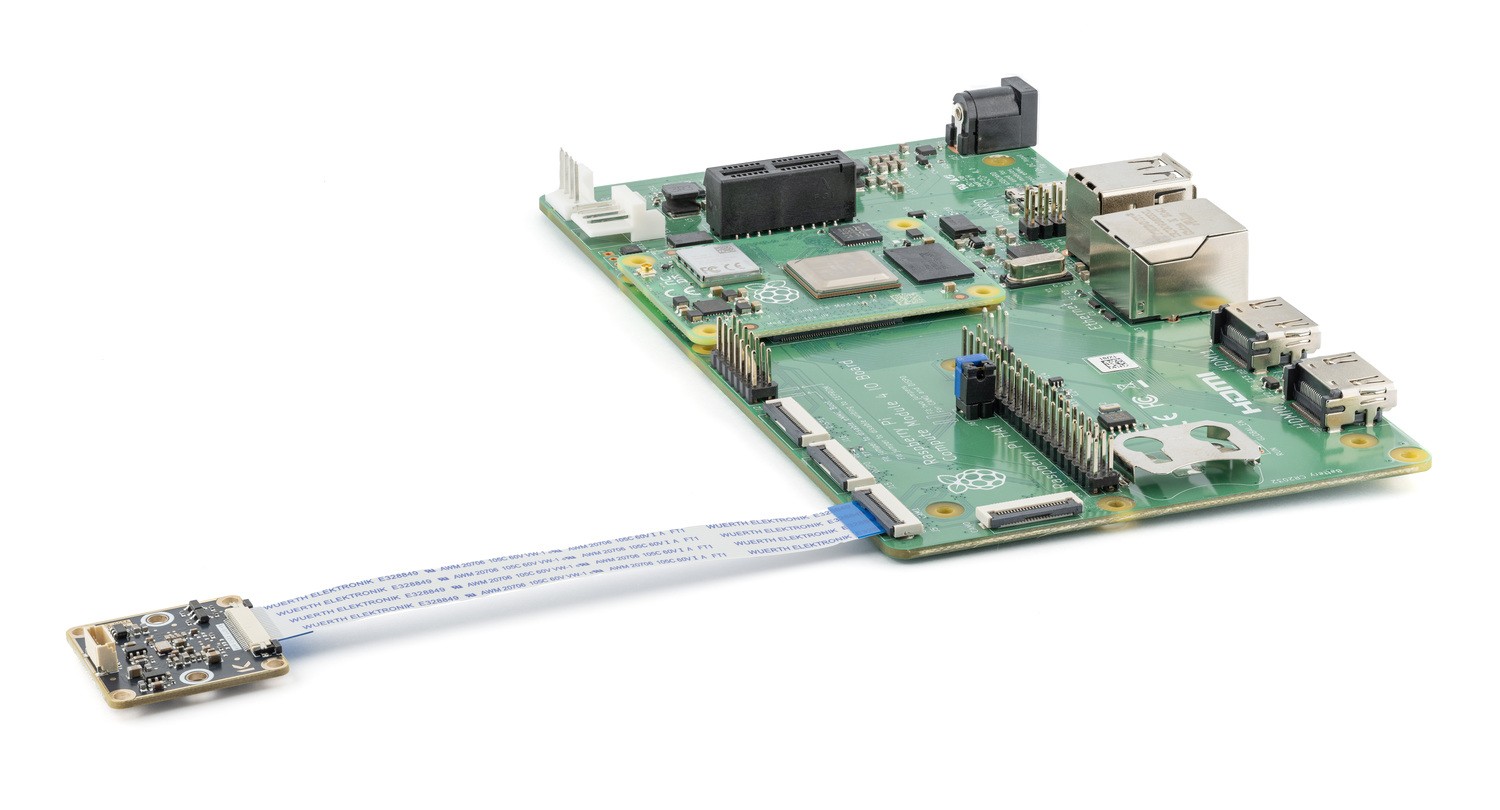](https://wiki.kurokesu.com/uploads/images/gallery/2025-06/image-1750012137831.jpg)In this picture camera is connected to cam1 port.
#### OS Prepare Login to your Raspberry device and update it first. ```shell sudo apt update sudo apt upgrade -y ``` ### IMX462 Camera [462x-CSI-M12x](https://www.kurokesu.com/shop/camera_modules/462x-CSI-M12x) #### Setup camera Edit config file: ```shell sudo nano /boot/firmware/config.txt # camera_auto_detect=1 --- Find camera_auto_detect=1 and comment it out. # Paste these lines at the end of the config file dtoverlay=imx462,cam1,clock-frequency=37125000 camera_auto_detect=0 ``` Reboot #### Test camera Check if camera is detected ```shell libcamera-hello --list-cameras Available cameras ----------------- 0 : imx462 [1920x1080 12-bit RGGB] (/base/soc/i2c0mux/i2c@0/imx290@1a) Modes: 'SRGGB10_CSI2P' : 1280x720 [60.00 fps - (320, 180)/1280x720 crop] 1920x1080 [60.00 fps - (0, 0)/1920x1080 crop] 'SRGGB12_CSI2P' : 1280x720 [60.00 fps - (320, 180)/1280x720 crop] 1920x1080 [60.00 fps - (0, 0)/1920x1080 crop] ``` Capture picture to /tmp/test.jpg ```shell libcamera-jpeg -o /tmp/test.jpg -n [0:04:03.062321913] [1710] INFO Camera camera_manager.cpp:326 libcamera v0.5.0+59-d83ff0a4 [0:04:03.107442902] [1713] WARN RPiSdn sdn.cpp:40 Using legacy SDN tuning - please consider moving SDN inside rpi.denoise [0:04:03.108303290] [1713] WARN CameraSensor camera_sensor_legacy.cpp:501 'imx462 0-001a': No sensor delays found in static properties. Assuming unverified defaults. [0:04:03.109060881] [1713] INFO RPI vc4.cpp:447 Registered camera /base/soc/i2c0mux/i2c@0/imx290@1a to Unicam device /dev/media1 and ISP device /dev/media2 [0:04:03.109105270] [1713] INFO RPI pipeline_base.cpp:1121 Using configuration file '/usr/share/libcamera/pipeline/rpi/vc4/rpi_apps.yaml' Mode selection for 960:540:12:P SRGGB10_CSI2P,1280x720/0 - Score: 1125 SRGGB10_CSI2P,1920x1080/0 - Score: 1375 SRGGB12_CSI2P,1280x720/0 - Score: 125 SRGGB12_CSI2P,1920x1080/0 - Score: 375 Stream configuration adjusted [0:04:03.110893565] [1710] INFO Camera camera.cpp:1205 configuring streams: (0) 960x540-YUV420 (1) 1280x720-SRGGB12_CSI2P [0:04:03.111358953] [1713] INFO RPI vc4.cpp:622 Sensor: /base/soc/i2c0mux/i2c@0/imx290@1a - Selected sensor format: 1280x720-SRGGB12_1X12 - Selected unicam format: 1280x720-pRCC Mode selection for 1920:1080:12:P SRGGB10_CSI2P,1280x720/0 - Score: 3000 SRGGB10_CSI2P,1920x1080/0 - Score: 1000 SRGGB12_CSI2P,1280x720/0 - Score: 2000 SRGGB12_CSI2P,1920x1080/0 - Score: 0 Stream configuration adjusted [0:04:08.370889477] [1710] INFO Camera camera.cpp:1205 configuring streams: (0) 1920x1080-YUV420 (1) 1920x1080-SRGGB12_CSI2P [0:04:08.374117010] [1713] INFO RPI vc4.cpp:622 Sensor: /base/soc/i2c0mux/i2c@0/imx290@1a - Selected sensor format: 1920x1080-SRGGB12_1X12 - Selected unicam format: 1920x1080-pRCC Still capture image received ```# Raspberry Pi 5 Bookworm #### Prepare SD card - Device: Raspberry Pi 5 (Raspberry Pi 5, 500, and Compute Module 5) - OS: Raspberry Pi OS (64-bit) (tested with release 2025-05-13) #### Connect CSI2 camera [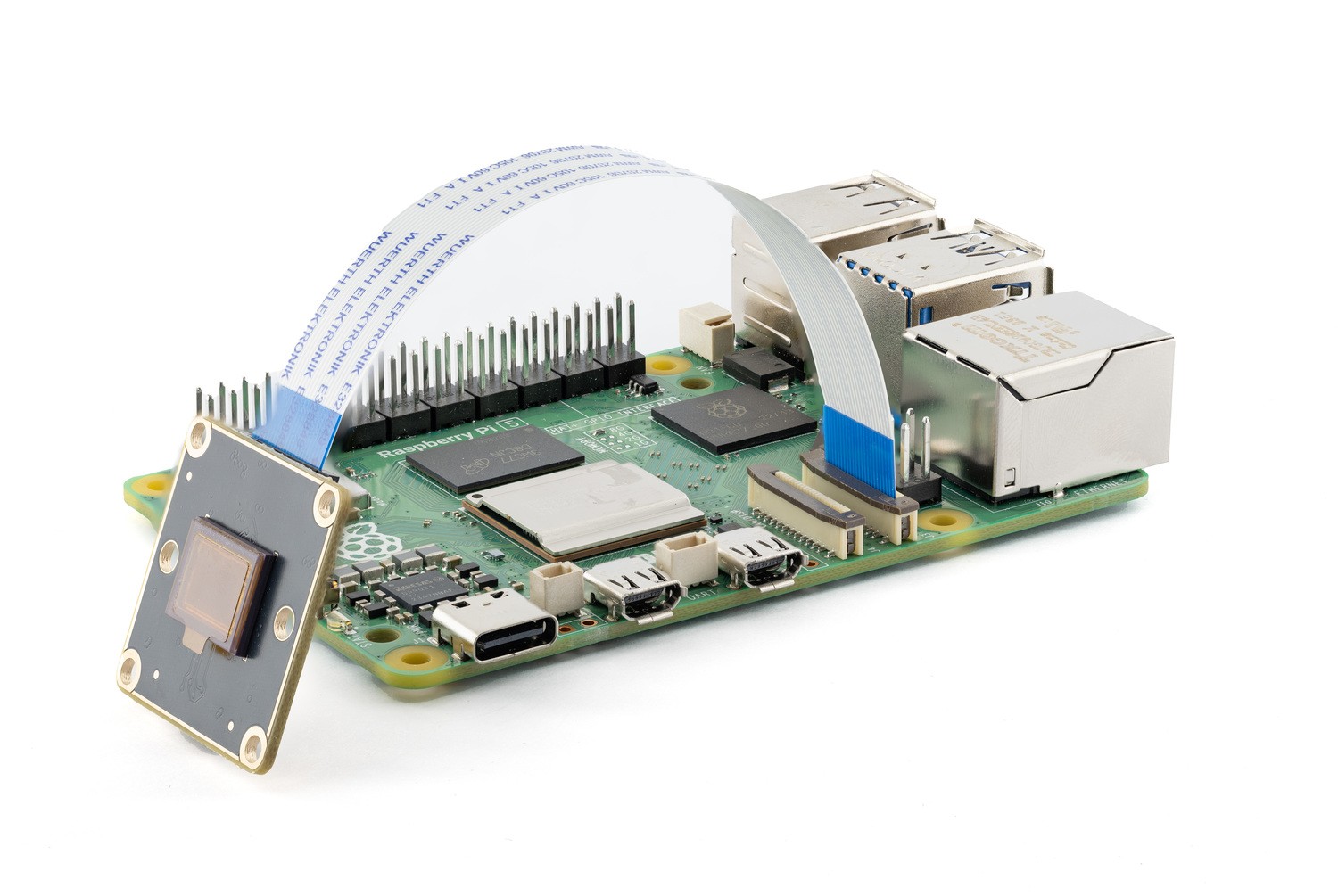](https://wiki.kurokesu.com/uploads/images/gallery/2025-06/image-1750065886673.jpg) #### OS Prepare Login to your Raspberry device and update it first. ```shell sudo apt update sudo apt upgrade -y ``` ### IMX462 Camera [462x-CSI-M12x](https://www.kurokesu.com/shop/camera_modules/462x-CSI-M12x) #### Setup camera Edit config file: ```shell sudo nano /boot/firmware/config.txt # camera_auto_detect=1 --- Find camera_auto_detect=1 and comment it out. # Paste these lines at the end of the config file dtoverlay=imx462,cam0,clock-frequency=37125000 camera_auto_detect=0 ``` Reboot #### Test camera Check if camera is detected ```shell libcamera-hello --list-cameras Available cameras ----------------- 0 : imx462 [1920x1080 12-bit RGGB] (/base/axi/pcie@1000120000/rp1/i2c@88000/imx290@1a) Modes: 'SRGGB10_CSI2P' : 1280x720 [60.00 fps - (320, 180)/1280x720 crop] 1920x1080 [60.00 fps - (0, 0)/1920x1080 crop] 'SRGGB12_CSI2P' : 1280x720 [60.00 fps - (320, 180)/1280x720 crop] 1920x1080 [60.00 fps - (0, 0)/1920x1080 crop] ``` Capture picture to /tmp/test.jpg ```shell libcamera-jpeg -o /tmp/test.jpg -n [0:00:18.871385025] [1789] INFO Camera camera_manager.cpp:326 libcamera v0.5.0+59-d83ff0a4 [0:00:18.878529284] [1792] INFO RPI pisp.cpp:720 libpisp version v1.2.1 981977ff21f3 29-04-2025 (14:13:50) [0:00:18.889916414] [1792] WARN CameraSensor camera_sensor_legacy.cpp:501 'imx462 10-001a': No sensor delays found in static properties. Assuming unverified defaults. [0:00:18.890301599] [1792] INFO RPI pisp.cpp:1179 Registered camera /base/axi/pcie@1000120000/rp1/i2c@88000/imx290@1a to CFE device /dev/media3 and ISP device /dev/media0 using PiSP variant BCM2712_C0 Mode selection for 960:540:12:P SRGGB10_CSI2P,1280x720/0 - Score: 1125 SRGGB10_CSI2P,1920x1080/0 - Score: 1375 SRGGB12_CSI2P,1280x720/0 - Score: 125 SRGGB12_CSI2P,1920x1080/0 - Score: 375 Stream configuration adjusted [0:00:18.890887136] [1789] INFO Camera camera.cpp:1205 configuring streams: (0) 960x540-YUV420 (1) 1280x720-RGGB_PISP_COMP1 [0:00:18.890972340] [1792] INFO RPI pisp.cpp:1483 Sensor: /base/axi/pcie@1000120000/rp1/i2c@88000/imx290@1a - Selected sensor format: 1280x720-SRGGB12_1X12 - Selected CFE format: 1280x720-PC1R Mode selection for 1920:1080:12:P SRGGB10_CSI2P,1280x720/0 - Score: 3000 SRGGB10_CSI2P,1920x1080/0 - Score: 1000 SRGGB12_CSI2P,1280x720/0 - Score: 2000 SRGGB12_CSI2P,1920x1080/0 - Score: 0 Stream configuration adjusted [0:00:24.120965985] [1789] INFO Camera camera.cpp:1205 configuring streams: (0) 1920x1080-YUV420 (1) 1920x1080-RGGB_PISP_COMP1 [0:00:24.124285707] [1792] INFO RPI pisp.cpp:1483 Sensor: /base/axi/pcie@1000120000/rp1/i2c@88000/imx290@1a - Selected sensor format: 1920x1080-SRGGB12_1X12 - Selected CFE format: 1920x1080-PC1R Still capture image received ```# Raspberry Pi 5 CM Bookworm #### Prepare SD card - Device: Raspberry Pi 5 (Raspberry Pi 5, 500, and Compute Module 5) - OS: Raspberry Pi OS (64-bit) (tested with release 2025-05-13) #### Connect CSI2 camera [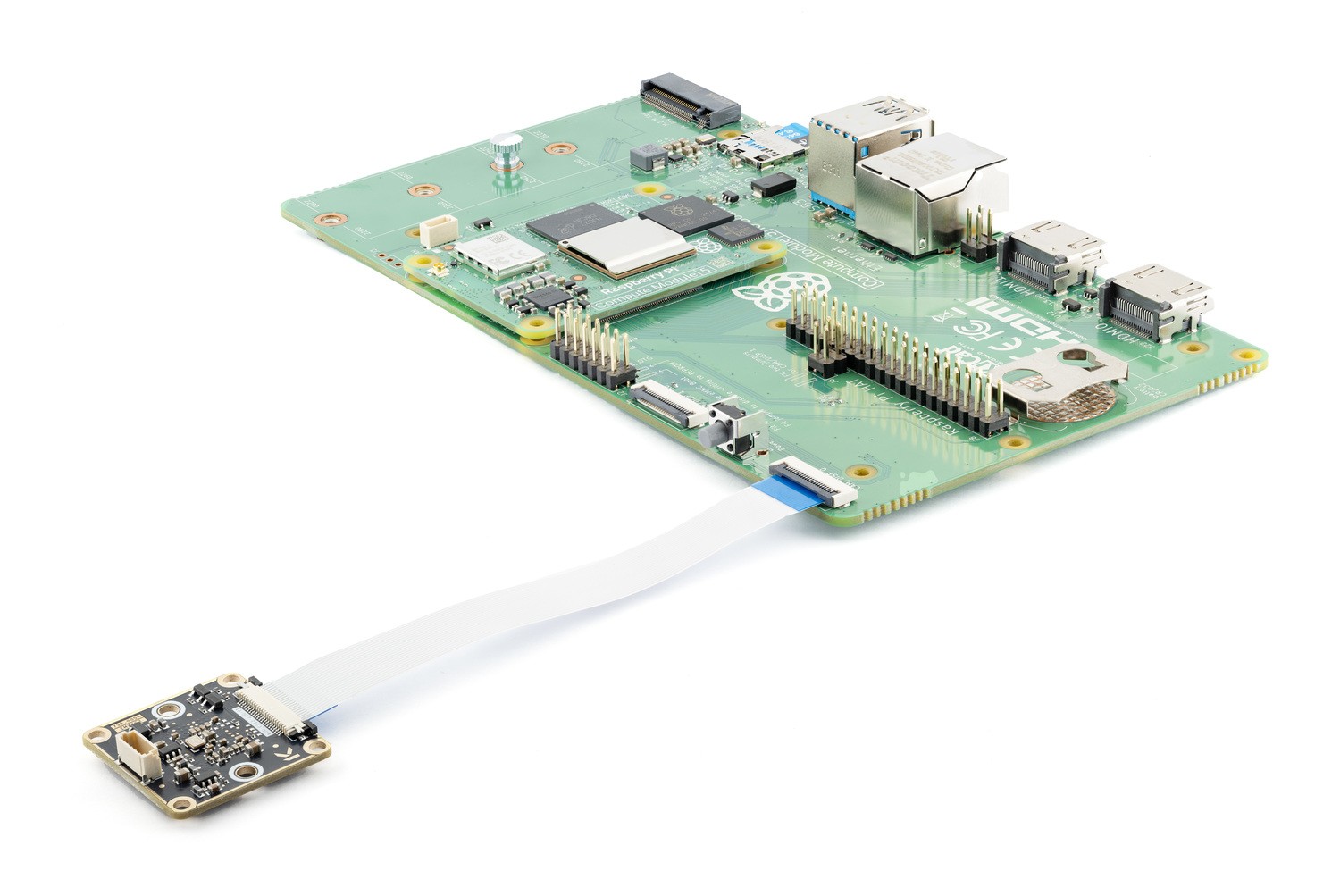](https://wiki.kurokesu.com/uploads/images/gallery/2025-06/image-1750065490758.jpg) #### OS Prepare Login to your Raspberry device and update it first. ```shell sudo apt update sudo apt upgrade -y ``` ### IMX462 Camera [462x-CSI-M12x](https://www.kurokesu.com/shop/camera_modules/462x-CSI-M12x) #### Setup camera Edit config file: ```shell sudo nano /boot/firmware/config.txt # camera_auto_detect=1 --- Find camera_auto_detect=1 and comment it out. # Paste these lines at the end of the config file dtoverlay=imx462,cam0,clock-frequency=37125000 camera_auto_detect=0 ```Note absent cam1 argument in dtoverlay string. If cam1 or cam0 is present Raspberry Pi will not recognize camera.
Reboot #### Test camera Check if camera is detected ```shell libcamera-hello --list-cameras Available cameras ----------------- 0 : imx462 [1920x1080 12-bit RGGB] (/base/axi/pcie@1000120000/rp1/i2c@88000/imx290@1a) Modes: 'SRGGB10_CSI2P' : 1280x720 [60.00 fps - (320, 180)/1280x720 crop] 1920x1080 [60.00 fps - (0, 0)/1920x1080 crop] 'SRGGB12_CSI2P' : 1280x720 [60.00 fps - (320, 180)/1280x720 crop] 1920x1080 [60.00 fps - (0, 0)/1920x1080 crop] ``` Capture picture to /tmp/test.jpg ```shell libcamera-jpeg -o /tmp/test.jpg -n [0:10:00.777872901] [1898] INFO Camera camera_manager.cpp:326 libcamera v0.5.0+59-d83ff0a4 [0:10:00.784948139] [1901] INFO RPI pisp.cpp:720 libpisp version v1.2.1 981977ff21f3 29-04-2025 (14:13:50) [0:10:00.797335934] [1901] WARN CameraSensor camera_sensor_legacy.cpp:501 'imx462 10-001a': No sensor delays found in static properties. Assuming unverified defaults. [0:10:00.797738960] [1901] INFO RPI pisp.cpp:1179 Registered camera /base/axi/pcie@1000120000/rp1/i2c@88000/imx290@1a to CFE device /dev/media0 and ISP device /dev/media2 using PiSP variant BCM2712_D0 Mode selection for 960:540:12:P SRGGB10_CSI2P,1280x720/0 - Score: 1125 SRGGB10_CSI2P,1920x1080/0 - Score: 1375 SRGGB12_CSI2P,1280x720/0 - Score: 125 SRGGB12_CSI2P,1920x1080/0 - Score: 375 Stream configuration adjusted [0:10:00.798351119] [1898] INFO Camera camera.cpp:1205 configuring streams: (0) 960x540-YUV420 (1) 1280x720-RGGB_PISP_COMP1 [0:10:00.798444510] [1901] INFO RPI pisp.cpp:1483 Sensor: /base/axi/pcie@1000120000/rp1/i2c@88000/imx290@1a - Selected sensor format: 1280x720-SRGGB12_1X12 - Selected CFE format: 1280x720-PC1R Mode selection for 1920:1080:12:P SRGGB10_CSI2P,1280x720/0 - Score: 3000 SRGGB10_CSI2P,1920x1080/0 - Score: 1000 SRGGB12_CSI2P,1280x720/0 - Score: 2000 SRGGB12_CSI2P,1920x1080/0 - Score: 0 Stream configuration adjusted [0:10:06.029136925] [1898] INFO Camera camera.cpp:1205 configuring streams: (0) 1920x1080-YUV420 (1) 1920x1080-RGGB_PISP_COMP1 [0:10:06.034005267] [1901] INFO RPI pisp.cpp:1483 Sensor: /base/axi/pcie@1000120000/rp1/i2c@88000/imx290@1a - Selected sensor format: 1920x1080-SRGGB12_1X12 - Selected CFE format: 1920x1080-PC1R Still capture image received ```# Raspberry Pi Zero 2 W #### Prepare SD card - Device: Raspberry Pi Zero 2 W - OS: Raspberry Pi OS (64-bit) (tested with release 2025-05-13) #### Connect CSI2 camera [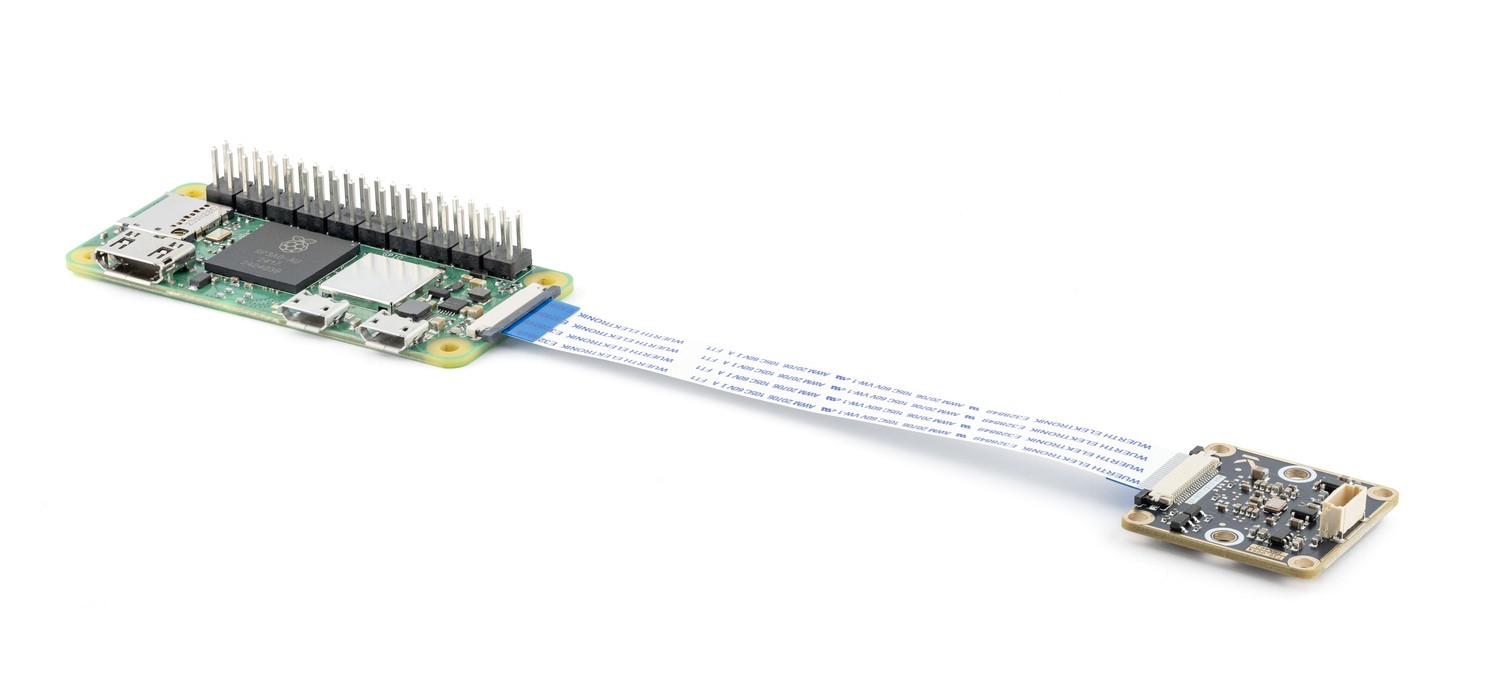](https://wiki.kurokesu.com/uploads/images/gallery/2025-06/image-1750013107665.jpg) #### OS Prepare Login to your Raspberry device and update it first. ```shell sudo apt update sudo apt upgrade -y ```This is important, when tested current OS without updating camera did not work. Will take a while to complete.
### IMX462 Camera [462x-CSI-M12x](https://www.kurokesu.com/shop/camera_modules/462x-CSI-M12x) #### Setup camera Edit config file: ```shell sudo nano /boot/firmware/config.txt # camera_auto_detect=1 --- Find camera_auto_detect=1 and comment it out. # Paste these lines at the end of the config file dtoverlay=imx462,clock-frequency=37125000 camera_auto_detect=0 ``` Reboot #### Test camera Check if camera is detected ```shell libcamera-hello --list-cameras Available cameras ----------------- 0 : imx462 [1920x1080 12-bit RGGB] (/base/soc/i2c0mux/i2c@1/imx290@1a) Modes: 'SRGGB10_CSI2P' : 1280x720 [60.00 fps - (320, 180)/1280x720 crop] 1920x1080 [60.00 fps - (0, 0)/1920x1080 crop] 'SRGGB12_CSI2P' : 1280x720 [60.00 fps - (320, 180)/1280x720 crop] 1920x1080 [60.00 fps - (0, 0)/1920x1080 crop] ``` Capture picture to /tmp/test.jpg ```shell libcamera-jpeg -o /tmp/test.jpg -n [0:00:52.859887270] [1022] INFO Camera camera_manager.cpp:326 libcamera v0.5.0+59-d83ff0a4 [0:00:53.151726905] [1073] WARN RPiSdn sdn.cpp:40 Using legacy SDN tuning - please consider moving SDN inside rpi.denoise [0:00:53.153496072] [1073] WARN CameraSensor camera_sensor_legacy.cpp:501 'imx462 10-001a': No sensor delays found in static properties. Assuming unverified defaults. [0:00:53.155367635] [1073] INFO RPI vc4.cpp:447 Registered camera /base/soc/i2c0mux/i2c@1/imx290@1a to Unicam device /dev/media3 and ISP device /dev/media0 [0:00:53.155573103] [1073] INFO RPI pipeline_base.cpp:1121 Using configuration file '/usr/share/libcamera/pipeline/rpi/vc4/rpi_apps.yaml' Mode selection for 960:540:12:P SRGGB10_CSI2P,1280x720/0 - Score: 1125 SRGGB10_CSI2P,1920x1080/0 - Score: 1375 SRGGB12_CSI2P,1280x720/0 - Score: 125 SRGGB12_CSI2P,1920x1080/0 - Score: 375 Stream configuration adjusted [0:00:53.169940083] [1022] INFO Camera camera.cpp:1205 configuring streams: (0) 960x540-YUV420 (1) 1280x720-SRGGB12_CSI2P [0:00:53.170743937] [1073] INFO RPI vc4.cpp:622 Sensor: /base/soc/i2c0mux/i2c@1/imx290@1a - Selected sensor format: 1280x720-SRGGB12_1X12 - Selected unicam format: 1280x720-pRCC Mode selection for 1920:1080:12:P SRGGB10_CSI2P,1280x720/0 - Score: 3000 SRGGB10_CSI2P,1920x1080/0 - Score: 1000 SRGGB12_CSI2P,1280x720/0 - Score: 2000 SRGGB12_CSI2P,1920x1080/0 - Score: 0 Stream configuration adjusted [0:00:58.453761956] [1022] INFO Camera camera.cpp:1205 configuring streams: (0) 1920x1080-YUV420 (1) 1920x1080-SRGGB12_CSI2P [0:00:58.457460706] [1073] INFO RPI vc4.cpp:622 Sensor: /base/soc/i2c0mux/i2c@1/imx290@1a - Selected sensor format: 1920x1080-SRGGB12_1X12 - Selected unicam format: 1920x1080-pRCC Still capture image received ```