| Python (Windows) | 3.8.4rc1 |
| OpenCV | 4.3.0 |
| Python (Windows) | 3.10.0 |
| OpenCV | 4.9.0 |
Not all firmware modifications are supported by gstreamer. If you experiencing streaming issues, feel free to [contact](https://www.kurokesu.com/shop/about_us) us. Update procedure is detailed [here](https://wiki.kurokesu.com/books/c1-family-camera-firmware-update-tool).
#### Inspect video device capabilities Video device details can be inspected with video4linux command `v4l2-ctl --device /dev/video2 --all` Video device should support H.264 pixel format. Various firmware modifications can have different configuration parameters and ```shell Driver Info: Driver name : uvcvideo Card type : KurokesuC1_536 : Kurokesu C Bus info : usb-0000:01:00.0-1.3 Driver version : 5.10.11 Capabilities : 0x84a00001 Video Capture Metadata Capture Streaming Extended Pix Format Device Capabilities Device Caps : 0x04200001 Video Capture Streaming Extended Pix Format Media Driver Info: Driver name : uvcvideo Model : KurokesuC1_536 : Kurokesu C Serial : SN000000 Bus info : usb-0000:01:00.0-1.3 Media version : 5.10.11 Hardware revision: 0x00000100 (256) Driver version : 5.10.11 Interface Info: ID : 0x03000008 Type : V4L Video Entity Info: ID : 0x00000007 (7) Name : KurokesuC1_536 : Kurokesu C Function : V4L2 I/O Pad 0x01000011 : 0: Sink Link 0x0200001e: from remote pad 0x1000010 of entity 'Extension 4': Data, Enabled, Immutable Priority: 2 Video input : 0 (Camera 1: ok) Format Video Capture: Width/Height : 1920/1080 Pixel Format : 'H264' (H.264) Field : None Bytes per Line : 3840 Size Image : 2073600 Colorspace : sRGB Transfer Function : Rec. 709 YCbCr/HSV Encoding: ITU-R 601 Quantization : Default (maps to Full Range) Flags : Crop Capability Video Capture: Bounds : Left 0, Top 0, Width 1920, Height 1080 Default : Left 0, Top 0, Width 1920, Height 1080 Pixel Aspect: 1/1 Selection: crop_default, Left 0, Top 0, Width 1920, Height 1080, Flags: Selection: crop_bounds, Left 0, Top 0, Width 1920, Height 1080, Flags: Streaming Parameters Video Capture: Capabilities : timeperframe Frames per second: 30.000 (30/1) Read buffers : 0 brightness 0x00980900 (int) : min=-64 max=64 step=1 default=0 value=0 contrast 0x00980901 (int) : min=0 max=64 step=1 default=32 value=32 saturation 0x00980902 (int) : min=0 max=128 step=1 default=52 value=52 hue 0x00980903 (int) : min=-40 max=40 step=1 default=0 value=0 white_balance_temperature_auto 0x0098090c (bool) : default=1 value=1 gamma 0x00980910 (int) : min=72 max=500 step=1 default=100 value=100 gain 0x00980913 (int) : min=0 max=100 step=1 default=0 value=0 power_line_frequency 0x00980918 (menu) : min=0 max=2 default=2 value=2 white_balance_temperature 0x0098091a (int) : min=2800 max=9300 step=1 default=4600 value=4600 flags=inactive sharpness 0x0098091b (int) : min=0 max=6 step=1 default=3 value=3 backlight_compensation 0x0098091c (int) : min=0 max=2 step=1 default=1 value=1 exposure_auto 0x009a0901 (menu) : min=0 max=3 default=3 value=3 exposure_absolute 0x009a0902 (int) : min=1 max=5000 step=1 default=156 value=156 flags=inactive exposure_auto_priority 0x009a0903 (bool) : default=0 value=0 ``` #### Debugging Useful commands: - `gst-launch-1.0 --gst-version` - read gstreamer version (tested with **GStreamer Core Library version 1.14.4**)# FFmpeg #### Stream live 1080p @ 30fps video to YouTube FFmpeg tool can be used to stream live video to youtube, recipe command is below. Also add silent audio with proper encoding. ```shell ffmpeg -re \ -f v4l2 \ -framerate 30 \ -video_size 1920x1080 \ -i /dev/video1 \ -ar 44100 \ -ac 2 \ -acodec pcm_s16le \ -f s16le \ -ac 2 \ -i /dev/zero \ -codec:a aac \ -ab 64k \ -strict experimental \ -vcodec copy \ -pix_fmt yuv420p \ -f flv "rtmp://a.rtmp.youtube.com/live2/[STREAM_ID]" ``` YouTube studio preview [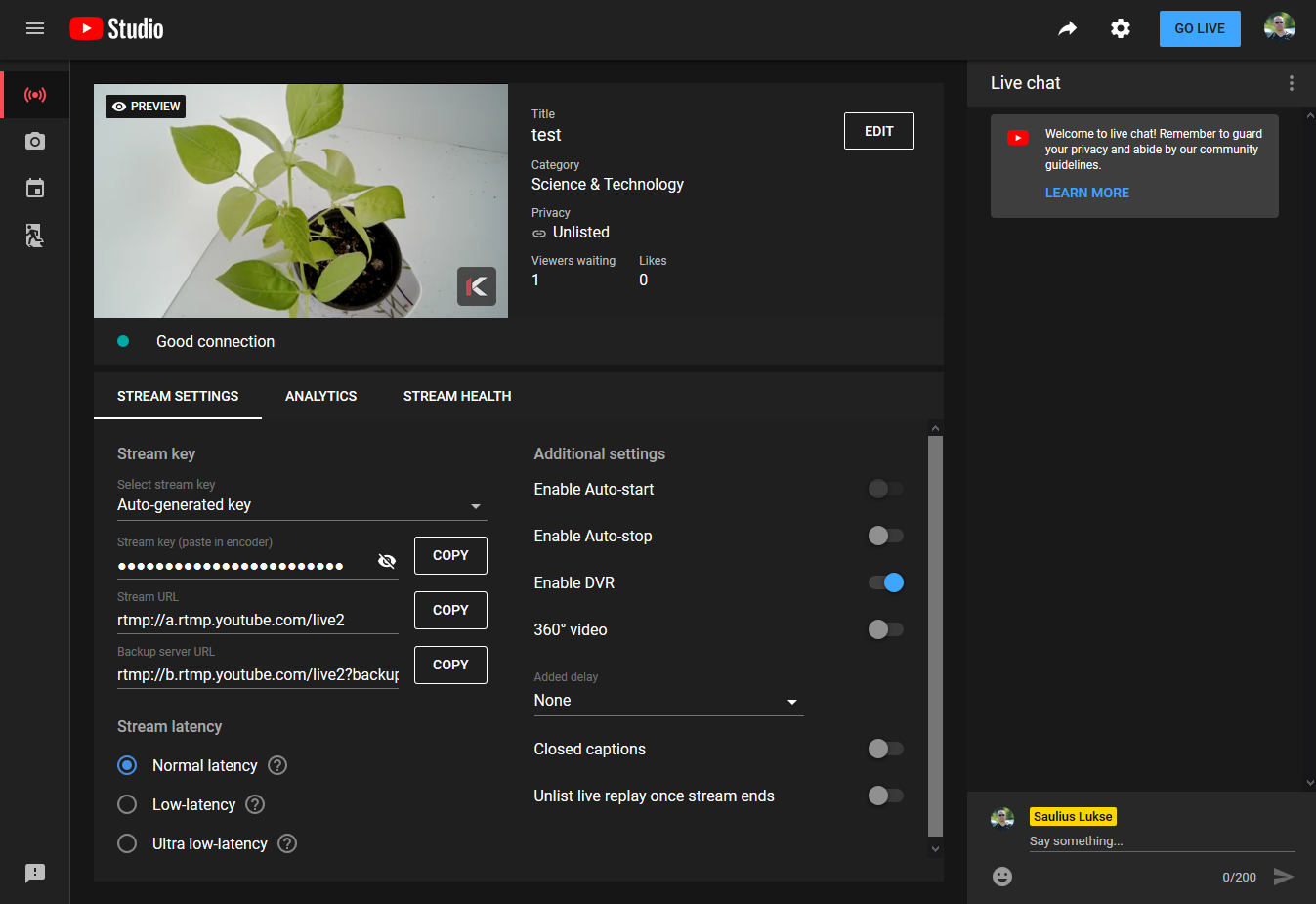](https://wiki.kurokesu.com/uploads/images/gallery/2020-07/youtube_stream.png) #### Record h.264 stream in Windows List connected devices `ffmpeg -hide_banner -list_devices true -f dshow -i dummy` ```shell [dshow @ 03e80ee0] DirectShow video devices (some may be both video and audio devices) [dshow @ 03e80ee0] "C2 RVN-3Q4WH" [dshow @ 03e80ee0] Alternative name "@device_pnp_\\?\usb#vid_16d0&pid_0ed4&mi_00#9&216b562&0&0000#{65e8773d-8f56-11d0-a3b9-00a0c9223196}\global" [dshow @ 03e80ee0] DirectShow audio devices [dshow @ 03e80ee0] "Input (M-Track)" [dshow @ 03e80ee0] Alternative name "@device_cm_{33D9A762-90C8-11D0-BD43-00A0C911CE86}\wave_{B212B620-6CA9-46A0-ACB6-F7379A77ADCC}" [dshow @ 03e80ee0] "Microphone (C2)" [dshow @ 03e80ee0] Alternative name "@device_cm_{33D9A762-90C8-11D0-BD43-00A0C911CE86}\wave_{65AA28A6-DECF-4DE1-9116-8D4F8B360AC2}" dummy: Immediate exit requested ``` Check device compression options `ffmpeg -hide_banner -f dshow -list_options true -i video="C2 RVN-3Q4WH"`Do not forget to replace camera name.
```shell [dshow @ 001a0f00] DirectShow video device options (from video devices) [dshow @ 001a0f00] Pin "Capture" (alternative pin name "0") [dshow @ 001a0f00] vcodec=mjpeg min s=1920x1080 fps=15 max s=1920x1080 fps=30 [dshow @ 001a0f00] vcodec=mjpeg min s=1920x1080 fps=15 max s=1920x1080 fps=30 [dshow @ 001a0f00] vcodec=mjpeg min s=1280x1024 fps=15 max s=1280x1024 fps=30 [dshow @ 001a0f00] vcodec=mjpeg min s=1280x1024 fps=15 max s=1280x1024 fps=30 [dshow @ 001a0f00] vcodec=mjpeg min s=1280x720 fps=15 max s=1280x720 fps=30 [dshow @ 001a0f00] vcodec=mjpeg min s=1280x720 fps=15 max s=1280x720 fps=30 [dshow @ 001a0f00] vcodec=mjpeg min s=720x576 fps=5 max s=720x576 fps=30 [dshow @ 001a0f00] vcodec=mjpeg min s=720x576 fps=5 max s=720x576 fps=30 [dshow @ 001a0f00] vcodec=mjpeg min s=720x480 fps=5 max s=720x480 fps=30 [dshow @ 001a0f00] vcodec=mjpeg min s=720x480 fps=5 max s=720x480 fps=30 [dshow @ 001a0f00] vcodec=mjpeg min s=640x480 fps=15 max s=640x480 fps=30 [dshow @ 001a0f00] vcodec=mjpeg min s=640x480 fps=15 max s=640x480 fps=30 [dshow @ 001a0f00] vcodec=mjpeg min s=1920x1080 fps=15 max s=1920x1080 fps=30 [dshow @ 001a0f00] vcodec=mjpeg min s=1920x1080 fps=15 max s=1920x1080 fps=30 [dshow @ 001a0f00] pixel_format=yuyv422 min s=1920x1080 fps=5 max s=1920x1080 fps=5 [dshow @ 001a0f00] pixel_format=yuyv422 min s=1920x1080 fps=5 max s=1920x1080 fps=5 [dshow @ 001a0f00] pixel_format=yuyv422 min s=1280x1024 fps=5 max s=1280x1024 fps=5 [dshow @ 001a0f00] pixel_format=yuyv422 min s=1280x1024 fps=5 max s=1280x1024 fps=5 [dshow @ 001a0f00] pixel_format=yuyv422 min s=1280x720 fps=5 max s=1280x720 fps=10 [dshow @ 001a0f00] pixel_format=yuyv422 min s=1280x720 fps=5 max s=1280x720 fps=10 [dshow @ 001a0f00] pixel_format=yuyv422 min s=800x600 fps=5 max s=800x600 fps=10 [dshow @ 001a0f00] pixel_format=yuyv422 min s=800x600 fps=5 max s=800x600 fps=10 [dshow @ 001a0f00] pixel_format=yuyv422 min s=720x576 fps=5 max s=720x576 fps=10 [dshow @ 001a0f00] pixel_format=yuyv422 min s=720x576 fps=5 max s=720x576 fps=10 [dshow @ 001a0f00] pixel_format=yuyv422 min s=720x480 fps=5 max s=720x480 fps=20 [dshow @ 001a0f00] pixel_format=yuyv422 min s=720x480 fps=5 max s=720x480 fps=20 [dshow @ 001a0f00] pixel_format=yuyv422 min s=640x480 fps=5 max s=640x480 fps=30 [dshow @ 001a0f00] pixel_format=yuyv422 min s=640x480 fps=5 max s=640x480 fps=30 [dshow @ 001a0f00] pixel_format=yuyv422 min s=1920x1080 fps=5 max s=1920x1080 fps=5 [dshow @ 001a0f00] pixel_format=yuyv422 min s=1920x1080 fps=5 max s=1920x1080 fps=5 [dshow @ 001a0f00] Pin "Capture" (alternative pin name "1") [dshow @ 001a0f00] vcodec=h264 min s=1920x1080 fps=5 max s=1920x1080 fps=30 [dshow @ 001a0f00] vcodec=h264 min s=1920x1080 fps=5 max s=1920x1080 fps=30 [dshow @ 001a0f00] vcodec=h264 min s=1280x1024 fps=5 max s=1280x1024 fps=30 [dshow @ 001a0f00] vcodec=h264 min s=1280x1024 fps=5 max s=1280x1024 fps=30 [dshow @ 001a0f00] vcodec=h264 min s=1280x720 fps=5 max s=1280x720 fps=30 [dshow @ 001a0f00] vcodec=h264 min s=1280x720 fps=5 max s=1280x720 fps=30 [dshow @ 001a0f00] vcodec=h264 min s=720x576 fps=5 max s=720x576 fps=30 [dshow @ 001a0f00] vcodec=h264 min s=720x576 fps=5 max s=720x576 fps=30 [dshow @ 001a0f00] vcodec=h264 min s=720x480 fps=5 max s=720x480 fps=30 [dshow @ 001a0f00] vcodec=h264 min s=720x480 fps=5 max s=720x480 fps=30 [dshow @ 001a0f00] vcodec=h264 min s=640x480 fps=5 max s=640x480 fps=30 [dshow @ 001a0f00] vcodec=h264 min s=640x480 fps=5 max s=640x480 fps=30 [dshow @ 001a0f00] vcodec=h264 min s=1920x1080 fps=5 max s=1920x1080 fps=30 [dshow @ 001a0f00] vcodec=h264 min s=1920x1080 fps=5 max s=1920x1080 fps=30 video=C2 RVN-3Q4WH: Immediate exit requested ``` Record h.264 compressed video directly from the camera `ffmpeg -hide_banner -f dshow -s 1920x1080 -r 30 -vcodec h264 -i video="C2 RVN-3Q4WH" output.mp4` ```shell Input #0, dshow, from 'video=C2 RVN-3Q4WH': Duration: N/A, start: 3447069.727000, bitrate: N/A Stream #0:0: Video: h264 (Main) (H264 / 0x34363248), yuv420p, 1920x1080, 30 fps, 30 tbr, 10000k tbn, 20000k tbc Stream mapping: Stream #0:0 -> #0:0 (h264 (native) -> h264 (libx264)) Press [q] to stop, [?] for help [libx264 @ 06507020] using cpu capabilities: MMX2 SSE2Fast SSSE3 SSE4.2 AVX FMA3 BMI2 AVX2 [libx264 @ 06507020] profile High, level 4.0 [libx264 @ 06507020] 264 - core 152 r2851 ba24899 - H.264/MPEG-4 AVC codec - Copyleft 2003-2017 - http://www.videolan.org/x264.html - options: cabac=1 ref=3 deblock=1:0:0 analyse=0x3:0x113 me=hex subme=7 psy=1 psy_rd=1.00:0.00 mixed_ref=1 me_range=16 chroma_me=1 trellis=1 8x8dct=1 cqm=0 deadzone=21,11 fast_pskip=1 chroma_qp_offset=-2 threads=34 lookahead_threads=5 sliced_threads=0 nr=0 decimate=1 interlaced=0 bluray_compat=0 constrained_intra=0 bframes=3 b_pyramid=2 b_adapt=1 b_bias=0 direct=1 weightb=1 open_gop=0 weightp=2 keyint=250 keyint_min=25 scenecut=40 intra_refresh=0 rc_lookahead=40 rc=crf mbtree=1 crf=23.0 qcomp=0.60 qpmin=0 qpmax=69 qpstep=4 ip_ratio=1.40 aq=1:1.00 Output #0, mp4, to 'output.mp4': Metadata: encoder : Lavf57.71.100 Stream #0:0: Video: h264 (libx264) ([33][0][0][0] / 0x0021), yuv420p, 1920x1080, q=-1--1, 30 fps, 15360 tbn, 30 tbc Metadata: encoder : Lavc57.89.100 libx264 Side data: cpb: bitrate max/min/avg: 0/0/0 buffer size: 0 vbv_delay: -1 frame= 121 fps= 27 q=-1.0 Lsize= 973kB time=00:00:03.93 bitrate=2026.3kbits/s speed=0.871x ### PRess CTRL + X to stop recording video:971kB audio:0kB subtitle:0kB other streams:0kB global headers:0kB muxing overhead: 0.226249% [libx264 @ 06507020] frame I:1 Avg QP:17.49 size: 43500 [libx264 @ 06507020] frame P:36 Avg QP:21.70 size: 15985 [libx264 @ 06507020] frame B:84 Avg QP:23.32 size: 4457 [libx264 @ 06507020] consecutive B-frames: 7.4% 0.0% 0.0% 92.6% [libx264 @ 06507020] mb I I16..4: 46.6% 47.6% 5.8% [libx264 @ 06507020] mb P I16..4: 3.3% 1.4% 0.0% P16..4: 50.3% 3.0% 5.3% 0.0% 0.0% skip:36.6% [libx264 @ 06507020] mb B I16..4: 0.1% 0.0% 0.0% B16..8: 25.5% 0.1% 0.0% direct: 5.3% skip:68.9% L0:42.0% L1:57.8% BI: 0.2% [libx264 @ 06507020] 8x8 transform intra:34.9% inter:90.6% [libx264 @ 06507020] coded y,uvDC,uvAC intra: 23.5% 56.0% 10.3% inter: 4.6% 27.7% 0.6% [libx264 @ 06507020] i16 v,h,dc,p: 22% 19% 12% 47% [libx264 @ 06507020] i8 v,h,dc,ddl,ddr,vr,hd,vl,hu: 22% 19% 42% 2% 3% 3% 3% 3% 3% [libx264 @ 06507020] i4 v,h,dc,ddl,ddr,vr,hd,vl,hu: 27% 30% 18% 5% 4% 3% 5% 2% 6% [libx264 @ 06507020] i8c dc,h,v,p: 55% 20% 19% 6% [libx264 @ 06507020] Weighted P-Frames: Y:0.0% UV:0.0% [libx264 @ 06507020] ref P L0: 59.4% 3.3% 25.4% 11.9% [libx264 @ 06507020] ref B L0: 87.0% 9.8% 3.3% [libx264 @ 06507020] ref B L1: 93.7% 6.3% [libx264 @ 06507020] kb/s:1970.28 Exiting normally, received signal 2. ```# V4L2 #### Install Install v4l utilities first. ```shell sudo apt install v4l-utils ``` #### Measure actual frame rate Set video format, and start streaming to `/dev/null` ```shell v4l2-ctl --device /dev/video1 -p 30 v4l2-ctl --device /dev/video1 --set-fmt-video=width=1920,height=1080,pixelformat=H264 ``` Start capturing and calculating ```shell v4l2-ctl --device /dev/video1 --stream-mmap=3 --stream-count=1000 --stream-to=/dev/null ``` Output from last command ```shell <<<<<<<<<<<<<<<<<<<<<<<<<<<<<<< 30.00 fps <<<<<<<<<<<<<<<<<<<<<<<<<<<<<<< 30.04 fps <<<<<<<<<<<<<<<<<<<<<<<<<<<<<< 30.03 fps <<<<<<<<<<<<<<<<<<<<<<<<<<<<< 30.00 fps <<<<<<<<<<<<<<<<<<<<<<<<<<<<<< 30.00 fps <<<<<<<<<<<<<<<<<<<<<<<<<<<<<< 30.00 fps ``` #### Get supported video formats /dev/video1 supports h.264 video stream ```shell v4l2-ctl --device /dev/video1 --list-formats ``` ```shell ioctl: VIDIOC_ENUM_FMT Index : 0 Type : Video Capture Pixel Format: 'H264' (compressed) Name : H.264 ``` /dev/video0 support MJPG and YUYV streams ```shell v4l2-ctl --device /dev/video0 --list-formats ``` ```shell ioctl: VIDIOC_ENUM_FMT Index : 0 Type : Video Capture Pixel Format: 'MJPG' (compressed) Name : Motion-JPEG Index : 1 Type : Video Capture Pixel Format: 'YUYV' Name : YUYV 4:2:2 ``` #### Get UVC control list ```shell v4l2-ctl -d /dev/video0 --list-ctrls ``` ```shell brightness 0x00980900 (int) : min=-64 max=64 step=1 default=0 value=0 contrast 0x00980901 (int) : min=0 max=64 step=1 default=32 value=32 saturation 0x00980902 (int) : min=0 max=128 step=1 default=64 value=64 hue 0x00980903 (int) : min=-40 max=40 step=1 default=0 value=0 white_balance_temperature_auto 0x0098090c (bool) : default=1 value=1 gamma 0x00980910 (int) : min=72 max=500 step=1 default=100 value=100 gain 0x00980913 (int) : min=0 max=63 step=1 default=0 value=0 power_line_frequency 0x00980918 (menu) : min=0 max=2 default=1 value=1 white_balance_temperature 0x0098091a (int) : min=2800 max=10000 step=1 default=4600 value=4600 flags=inactive sharpness 0x0098091b (int) : min=0 max=6 step=1 default=3 value=3 backlight_compensation 0x0098091c (int) : min=0 max=2 step=1 default=1 value=1 exposure_auto 0x009a0901 (menu) : min=0 max=3 default=3 value=3 exposure_absolute 0x009a0902 (int) : min=1 max=10000 step=1 default=156 value=156 flags=inactive exposure_auto_priority 0x009a0903 (bool) : default=0 value=0 ``` #### Set white ballance ```shell v4l2-ctl -d /dev/video0 -c white_balance_temperature_auto=0 v4l2-ctl -d /dev/video0 -c white_balance_temperature=3000 ``` #### Get supported video formats ```shell v4l2-ctl -d /dev/video0 --list-formats-ext ``` ```shell ioctl: VIDIOC_ENUM_FMT Index : 0 Type : Video Capture Pixel Format: 'MJPG' (compressed) Name : Motion-JPEG Size: Discrete 1920x1080 Interval: Discrete 0.033s (30.000 fps) Interval: Discrete 0.040s (25.000 fps) Interval: Discrete 0.050s (20.000 fps) Interval: Discrete 0.067s (15.000 fps) Size: Discrete 1280x1024 Interval: Discrete 0.033s (30.000 fps) Interval: Discrete 0.040s (25.000 fps) Interval: Discrete 0.050s (20.000 fps) Interval: Discrete 0.067s (15.000 fps) Size: Discrete 1280x720 Interval: Discrete 0.033s (30.000 fps) Interval: Discrete 0.040s (25.000 fps) Interval: Discrete 0.050s (20.000 fps) Interval: Discrete 0.067s (15.000 fps) Size: Discrete 720x576 Interval: Discrete 0.033s (30.000 fps) Interval: Discrete 0.040s (25.000 fps) Interval: Discrete 0.050s (20.000 fps) Interval: Discrete 0.067s (15.000 fps) Interval: Discrete 0.100s (10.000 fps) Interval: Discrete 0.200s (5.000 fps) Size: Discrete 720x480 Interval: Discrete 0.033s (30.000 fps) Interval: Discrete 0.040s (25.000 fps) Interval: Discrete 0.050s (20.000 fps) Interval: Discrete 0.067s (15.000 fps) Interval: Discrete 0.100s (10.000 fps) Interval: Discrete 0.200s (5.000 fps) Size: Discrete 640x480 Interval: Discrete 0.033s (30.000 fps) Interval: Discrete 0.040s (25.000 fps) Interval: Discrete 0.050s (20.000 fps) Interval: Discrete 0.067s (15.000 fps) Size: Discrete 1920x1080 Interval: Discrete 0.033s (30.000 fps) Interval: Discrete 0.040s (25.000 fps) Interval: Discrete 0.050s (20.000 fps) Interval: Discrete 0.067s (15.000 fps) Index : 1 Type : Video Capture Pixel Format: 'YUYV' Name : YUYV 4:2:2 Size: Discrete 1920x1080 Interval: Discrete 0.200s (5.000 fps) Size: Discrete 1280x1024 Interval: Discrete 0.200s (5.000 fps) Size: Discrete 1280x720 Interval: Discrete 0.100s (10.000 fps) Interval: Discrete 0.200s (5.000 fps) Size: Discrete 800x600 Interval: Discrete 0.100s (10.000 fps) Interval: Discrete 0.200s (5.000 fps) Size: Discrete 720x576 Interval: Discrete 0.100s (10.000 fps) Interval: Discrete 0.200s (5.000 fps) Size: Discrete 720x480 Interval: Discrete 0.050s (20.000 fps) Interval: Discrete 0.067s (15.000 fps) Interval: Discrete 0.100s (10.000 fps) Interval: Discrete 0.200s (5.000 fps) Size: Discrete 640x480 Interval: Discrete 0.033s (30.000 fps) Interval: Discrete 0.040s (25.000 fps) Interval: Discrete 0.050s (20.000 fps) Interval: Discrete 0.067s (15.000 fps) Interval: Discrete 0.100s (10.000 fps) Interval: Discrete 0.200s (5.000 fps) Size: Discrete 1920x1080 Interval: Discrete 0.200s (5.000 fps) ``` #### Tell everything about camera ```shell v4l2-ctl --all ``` ```shell Driver Info: Driver name : uvcvideo Card type : C2: C2 RVN-3Q4WH Bus info : usb-0000:00:14.0-1.1.2 Driver version : 5.11.21 Capabilities : 0x84a00001 Video Capture Metadata Capture Streaming Extended Pix Format Device Capabilities Device Caps : 0x04200001 Video Capture Streaming Extended Pix Format Priority: 2 Video input : 0 (Camera 1: ok) Format Video Capture: Width/Height : 1920/1080 Pixel Format : 'MJPG' (Motion-JPEG) Field : None Bytes per Line : 0 Size Image : 4147789 Colorspace : Default Transfer Function : Default (maps to Rec. 709) YCbCr/HSV Encoding: Default (maps to ITU-R 601) Quantization : Default (maps to Full Range) Flags : Crop Capability Video Capture: Bounds : Left 0, Top 0, Width 1920, Height 1080 Default : Left 0, Top 0, Width 1920, Height 1080 Pixel Aspect: 1/1 Selection Video Capture: crop_default, Left 0, Top 0, Width 1920, Height 1080, Flags: Selection Video Capture: crop_bounds, Left 0, Top 0, Width 1920, Height 1080, Flags: Streaming Parameters Video Capture: Capabilities : timeperframe Frames per second: 10000000.000 (10000000/1) Read buffers : 0 brightness 0x00980900 (int) : min=-64 max=64 step=1 default=0 value=0 contrast 0x00980901 (int) : min=0 max=64 step=1 default=32 value=32 saturation 0x00980902 (int) : min=0 max=128 step=1 default=64 value=64 hue 0x00980903 (int) : min=-40 max=40 step=1 default=0 value=0 white_balance_temperature_auto 0x0098090c (bool) : default=1 value=1 gamma 0x00980910 (int) : min=72 max=500 step=1 default=100 value=100 gain 0x00980913 (int) : min=0 max=48 step=1 default=0 value=0 power_line_frequency 0x00980918 (menu) : min=0 max=2 default=2 value=2 0: Disabled 1: 50 Hz 2: 60 Hz white_balance_temperature 0x0098091a (int) : min=2800 max=9300 step=1 default=4600 value=4600 flags=inactive sharpness 0x0098091b (int) : min=0 max=6 step=1 default=3 value=3 backlight_compensation 0x0098091c (int) : min=0 max=2 step=1 default=1 value=1 exposure_auto 0x009a0901 (menu) : min=0 max=3 default=3 value=3 1: Manual Mode 3: Aperture Priority Mode exposure_absolute 0x009a0902 (int) : min=1 max=5000 step=1 default=156 value=156 flags=inactive exposure_auto_priority 0x009a0903 (bool) : default=0 value=0 ```